Posts tagged "AI"
-
DeepSeek V4.1 Flash is now available through OpenRouter on Netlify’s AI Gateway with zero configuration required.
Use the OpenRouter SDK directly in your Netlify Functions without managing API keys or authentication. AI Gateway handles everything automatically. Here’s an example using DeepSeek V4.1 Flash:
import { OpenRouter } from '@openrouter/sdk';export default async () => {const client = new OpenRouter();const response = await client.chat.send({chatRequest: {model: 'deepseek/deepseek-v4.1-flash',messages: [{ role: 'user', content: 'How can AI improve my coding?' }],maxTokens: 400,},});return Response.json(response);};DeepSeek V4.1 Flash is available across Background Functions, Scheduled Functions, and Edge Functions. You get automatic access to Netlify’s rate limiting and authentication infrastructure.
Learn more in the AI Gateway documentation and OpenRouter documentation.
-
Agent Runners are now better at completing their work when a run has less credits remaining than the task requires.
If you are close to running our of credits during a run, the agent will start focusing on delivering the most useful result it can with the credits it has left. It finishes work already in progress, leaves the project in a working state, and provides a clear summary of what it completed.
Previously, an ambitious task could end abruptly before the agent wrapped up, leaving partial changes and little explanation. Now, you’re more likely to get a working result you can use right away, or a solid, clearly documented starting point for your next run.
This improvement applies automatically to every agent and model available in Agent Runners. There’s nothing to enable or configure. Learn more in Make changes with Agent Runners and how credits work.
-
Agent Runners can now ask you clarifying questions before they start building. When a few details could significantly improve the result, the agent pauses and asks instead of guessing.
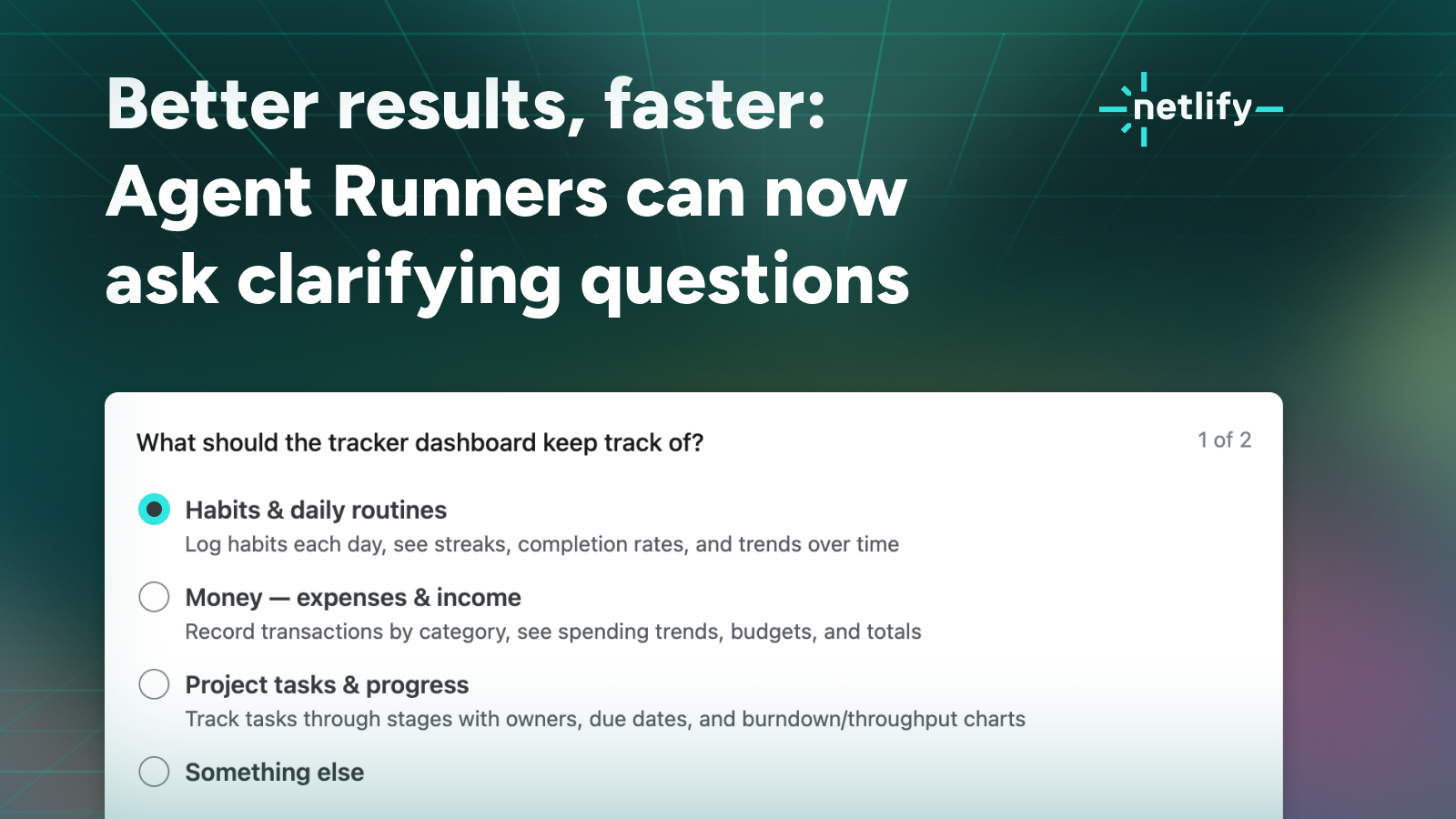
How clarifying questions work
Say you start with something broad, like “Build a tracker dashboard.” Previously the agent had to make every call for you: what the dashboard should track, whether entries should be editable and saved to a database or live in the code as a read-only placeholder, whether the look should be dark and high-contrast or light, clean, and editorial. Now it can ask, and you can answer directly where the agent run works.
Answer, skip, or add your own context
Answering questions is always optional so you can answer the ones you have opinions about and skip the rest. Or you can skip all questions and let the agent decide. Finally, you can always add context in your own words alongside your answers.
In our testing, even a few quick answers make the first build noticeably sharper and saves credits you’d otherwise spend on course corrections.
Once you answer, the run continues as usual: the agent writes the code, works with Netlify’s platform features, and creates a Deploy Preview you can review and iterate on.
Learn more
Clarifying questions work with every agent and model available in Agent Runners.
Try it out and see how to use Agent Runners in our docs.
-
The AI Gateway now supports OpenRouter, giving you access to models from providers beyond Netlify’s direct integrations (OpenAI, Anthropic, Google Gemini).
This partnership opens up models from providers like DeepSeek, Meta, Mistral, Qwen, and xAI, all billed through your existing Netlify credits.
Learn more about our OpenRouter partnership through the Netlify blog on open models.
Supported models
For a full list of models available on OpenRouter, visit OpenRouter’s models page.
Note that Netlify only allows requests through OpenRouter for model providers that support a Zero Data Retention (ZDR) policy, meaning your prompts and outputs are never stored nor trained on. Models on OpenRouter that do not have any available provider guaranteeing this policy (at the time of your request) are not available via Netlify.
Set up OpenRouter for AI Gateway
As with the other providers, Netlify automatically injects
OPENROUTER_API_KEYandOPENROUTER_BASE_URLinto your Netlify Functions, Edge Functions, and Preview Server (unless you’ve already set your own values for either).You can call an OpenRouter-served model using whichever client you prefer:
- OpenRouter SDK (
@openrouter/sdk): passOPENROUTER_BASE_URLexplicitly asserverURLwhen constructing the client, this is the one exception where the base URL isn’t picked up automatically. - OpenAI SDK: works out of the box, no extra config. Just pass a model ID in OpenRouter notation (e.g.
deepseek/deepseek-v4-flash-0731). - REST API: call
${OPENROUTER_BASE_URL}/chat/completionswith a bearer token fromOPENROUTER_API_KEY.
Whichever client you use, you can find model IDs to pass in the OpenRouter models directory.
Note that a model listed in OpenRouter’s directory will not work through the AI Gateway if it does not support a Zero Data Retention (ZDR) policy since Netlify only routes to OpenRouter providers with this support.
To learn more about using AI Gateway, check out our official AI Gateway Netlify docs.
- OpenRouter SDK (
-
Through a new partnership with OpenRouter, you can now choose OpenCode as an AI agent with Agent Runners. OpenCode allows you to choose many different AI models, including Kimi, DeepSeek, and GLM.
Learn more about our OpenRouter partnership through the Netlify blog on open models.
Previously, you could only choose Claude, Gemini, or Codex as your AI agent, but now you can choose the OpenCode agent, which offers even more models from different AI providers.
Requests made through OpenCode are only routed to model providers with a Zero Data Retention (ZDR) policy, so your prompts and outputs are never stored.
AI model selection
As part of this release, you can now also specify which model any agent uses with Agent Runners. Previously, Claude, Gemini, and Codex agents all automatically chose a model for the task you prompted with Agent Runners.
Agents can still auto-select a model for you, but now you can also choose different models for your agents, with these preferences saved just for you on your device.
This means you can experiment with which AI models best fit your needs.
To open your AI model options for Agent Runners, select agent near your prompt box.
Choosing the best AI model for your needs
To help you choose the best AI model for your needs, within Agent Runners you can browse details about each model, including a link to learn more, a visual way to compare cost across all supported models with a 1-5 dot scale, and the option to set an effort level for that model.
To get the most out of your credits, consider the following strategies:
- Use a more expensive, capable model to help you plan your project updates and design a clear prompt with Agent Runners’ ask mode, then switch to a cheaper model to implement the changes.
- Experiment with using different AI models for different tasks.
- Be explicit about the functionality you want when using models that are cheaper or set to a lower effort level. These models may fill in placeholder functionality. For example, a model might render a contact page without fully setting up working Netlify Forms, so the page looks complete but doesn’t actually work as expected.
Learn more
To learn more, check out our docs:
-
Netlify Agent Runners now have a mode selector. Pick Ask and the agent reads, investigates, and answers questions about your project. Build is still the default and works exactly as before.
Ask mode is strictly read-only. The agent can’t edit files, run commands, deploy, or change settings. With no build or Deploy Preview, Ask runs are often faster and use fewer credits.
It answers with real context: your repository, your project context, and your project’s Netlify Database. Your data is often the fastest way to answer a question about your app, and Ask mode can query it with no risk of a write.
A few prompts to steal:
- “How many users are in the database?”
- “Walk me through how authentication is implemented in this project. Which files handle it, and where is the token stored?”
- “Our Largest Contentful Paint is bad on mobile. Read the code and tell me what’s most likely responsible.”
- “Plan out how we can migrate to the latest version of Astro.”
Because it’s a mode on the same run, you can switch to Build the moment an answer turns into a task — same run, same context, no re-explaining.
Ask mode is available on all agents, Claude Code, Google Gemini, and OpenAI Codex, in Agent Runners today. See the docs on Ask and Build modes.
-
GPT-5.6 Luna now costs 80% less and GPT-5.6 Terra is 20% less through Netlify AI Gateway, making both models more cost-efficient for production AI workloads.
These reductions improve the price-performance tradeoff across the GPT-5.6 model family, giving teams more flexibility to choose the right balance of capability and cost for each workload.
Learn more in OpenAI’s announcement, Advancing the price-performance frontier with GPT-5.6.
-
We have redesigned Netlify functions for an improved agent experience.
With these updates, functions are more discoverable, easier to autocomplete, update, and manage for people and agents alike. They move function configuration into code, making it type-safe and immediately visible to editors, tools, and agents, with no platform-specific naming conventions to memorize or get wrong. None of these changes are breaking, so you can adopt them on your own timeline.
Netlify Functions are serverless functions that run on-demand in response to HTTP requests or platform events. They handle server-side logic without any infrastructure to manage, and live in your repository at
netlify/functions/.To learn more about these updates in depth, check out our blog on redesigning Netlify functions for agent experience. See the table below for a summary.
Feature What changed What it means for agents What you need to do Event handlers Export typed event handlers from the default export object Typed handlers are discoverable like any API, with no magic filenames to guess or get wrong. Nothing required. Adopt the new syntax for new event handlers for better agent discoverability and updates. Background functions Declare with background: truein config instead of the-backgroundfilename suffixType-safe and config-driven, not name-driven. Agents can set it in code without guessing platform naming conventions, and get an error if the value is wrong. Nothing required. The -backgroundsuffix still works.Region selection Set per-function via the regionconfig property, replacing the global UI settingAgents can set region as a type-safe config property, catching invalid values before deploy rather than at runtime. Use deploy previews to test before going live. Nothing required. Optionally move region out of the UI into config for per-function control. Memory and vCPU Set via memoryorvcpuconfig properties; both values scale together automaticallyAgents provisioning compute-heavy workloads (inference, large payloads) can do so in code. Nothing. Defaults unchanged. Set only if your workload needs more than 1 GB / 0.5 vCPU. Requires a credit-based Pro plan. getContext()Named import from @netlify/functions, replacing theNetlify.contextglobalNamed imports surface in autocomplete and carry type information. Globals are invisible to agents; named imports are not. Nothing required. Netlify.contextstill works. Switch togetContext()for better discoverability.Learn more in the Netlify Functions documentation, which has also been recently revamped.
-
Netlify is now listed in the Cursor marketplace, so you can connect your AI-assisted coding environment directly to Netlify without leaving your editor.
Whether you’re spinning up a new project or iterating on an existing site, having Netlify available from within Cursor means fewer context switches between building and deploying.
Find it at cursor.com/marketplace/netlify.