Posts tagged "Agent-runners"
-
Agent Runners are now better at completing their work when a run has less credits remaining than the task requires.
If you are close to running our of credits during a run, the agent will start focusing on delivering the most useful result it can with the credits it has left. It finishes work already in progress, leaves the project in a working state, and provides a clear summary of what it completed.
Previously, an ambitious task could end abruptly before the agent wrapped up, leaving partial changes and little explanation. Now, you’re more likely to get a working result you can use right away, or a solid, clearly documented starting point for your next run.
This improvement applies automatically to every agent and model available in Agent Runners. There’s nothing to enable or configure. Learn more in Make changes with Agent Runners and how credits work.
-
OpenAI’s ChatGPT Images 2.5 models are now available through Netlify’s AI Gateway and Agent Runners with zero configuration required. Use
gpt-image-2.5-flareorgpt-image-2.5-sunburstto generate images for your applications.Use the OpenAI SDK directly in your Netlify Functions without managing API keys or authentication. AI Gateway handles everything automatically. Here’s an example using the
gpt-image-2.5-flaremodel:import OpenAI from 'openai';const ai = new OpenAI();export default async (req, context) => {const response = await ai.images.generate({model: 'gpt-image-2.5-flare',prompt: 'A golden retriever working at a laptop in a sunny startup office',size: '1024x1024',quality: 'low',output_format: 'jpeg',output_compression: 80});const imageBuffer = Buffer.from(response.data[0].b64_json, 'base64');return new Response(imageBuffer, {status: 200,headers: {'content-type': 'image/jpeg','cache-control': 'no-store'}});};Both ChatGPT Images 2.5 models are available across standard Functions, Background Functions, Scheduled Functions, Edge Functions, and Agent Runners. You get automatic access to Netlify’s caching, rate limiting, and authentication infrastructure.
Learn more in the AI Gateway documentation and Agent Runners documentation.
-
Agent Runners can now scope ambitious prompts for new projects to create a partial working project and provide next steps within the available credit budget.
Previously, a brand new project could use up its credit budget before the agent finished for ambitious prompts, leaving the run marked Cancelled partway through.
Now, your agent scopes the work more intelligently. It builds out part of the project and shares a plan for next steps, so you can preview a working version within your new project credit budget instead of the run stalling out.
Learn more in Make changes with Agent Runners.
-
OpenAI’s GPT-6 Astra model is now available through Netlify’s AI Gateway and Agent Runners with zero configuration required.
Use the OpenAI SDK directly in your Netlify Functions without managing API keys or authentication. AI Gateway handles everything automatically. Here’s an example using GPT-6 Astra with the Responses API:
import OpenAI from 'openai';export default async () => {const openai = new OpenAI();const response = await openai.responses.create({model: 'gpt-6-astra',input: 'Give a concise explanation of how AI works.',});return Response.json(response);};GPT-6 Astra is also available across Background Functions, Scheduled Functions, and Edge Functions. You get automatic access to Netlify’s caching, rate limiting, and authentication infrastructure.
Learn more in the AI Gateway documentation and Agent Runners documentation.
-
Google’s Gemini 3.8 Flash model is now available through Netlify’s AI Gateway and Agent Runners with zero configuration required.
Use the Google GenAI SDK directly in your Netlify Functions without managing API keys or authentication. The AI Gateway handles everything automatically. Here’s an example using the Gemini 3.8 Flash model:
import { GoogleGenAI } from '@google/genai';export default async () => {const ai = new GoogleGenAI({});const response = await ai.models.generateContent({model: 'gemini-3.8-flash',contents: 'How can AI improve my coding?'});return Response.json(response);};Gemini 3.8 Flash is available for all Function types and Agent Runners. You get automatic access to Netlify’s caching, rate limiting, and authentication infrastructure.
Learn more in the AI Gateway documentation and Agent Runners documentation.
-
Anthropic’s Claude Fable 5.1 model is now available through Netlify’s AI Gateway and Agent Runners with zero configuration required.
Use the Anthropic SDK directly in your Netlify Functions without managing API keys or authentication. The AI Gateway handles everything automatically. Here’s an example using the Claude Fable 5.1 model:
import Anthropic from '@anthropic-ai/sdk';export default async () => {const anthropic = new Anthropic();const response = await anthropic.messages.create({model: 'claude-fable-5-1',max_tokens: 4096,messages: [{role: 'user',content: 'How can AI improve my coding?'}]});return new Response(JSON.stringify(response), {headers: { 'Content-Type': 'application/json' }});};Claude Fable 5.1 is available for all Function types and Agent Runners. You get automatic access to Netlify’s caching, rate limiting, and authentication infrastructure.
Learn more in the AI Gateway documentation and Agent Runners documentation.
-
Private projects on Netlify will now show a pre-launch toolbar so you can share your project for review and run audits using AI checks before you make your project public.
Private projects and agent runs require a Credit pricing plan. If you’re on a Legacy pricing plan, you will not have access to the pre-launch toolbar. Audits consume credits like any other agent run.
For public projects, new projects created on a Free plan on or after August 19, 2026 show a Powered by Netlify badge to all visitors.
The badge is configurable for each project through your project configuration settings.
To turn the Netlify badge on or off for all visitors of your site:
- Go to Project configuration > General > Powered by Netlify badge and turn it on or off.
Additionally, any visitor can hide the badge for themselves, and that choice is stored locally on their browser and never reaches Netlify.
All projects created before August 19, 2026 have the badge off by default.
Users on a Credit-based Personal and Pro plans can also turn the badge on or off per-project. For these plans, the badge is always off by default.
Release timeline
We’re rolling both overlays out gradually over the next few weeks, so a project that qualifies may not have them yet.
Learn more about the pre-launch toolbar and the Powered by Netlify badge in the Netlify documentation.
-
Agent Runners can now ask you clarifying questions before they start building. When a few details could significantly improve the result, the agent pauses and asks instead of guessing.
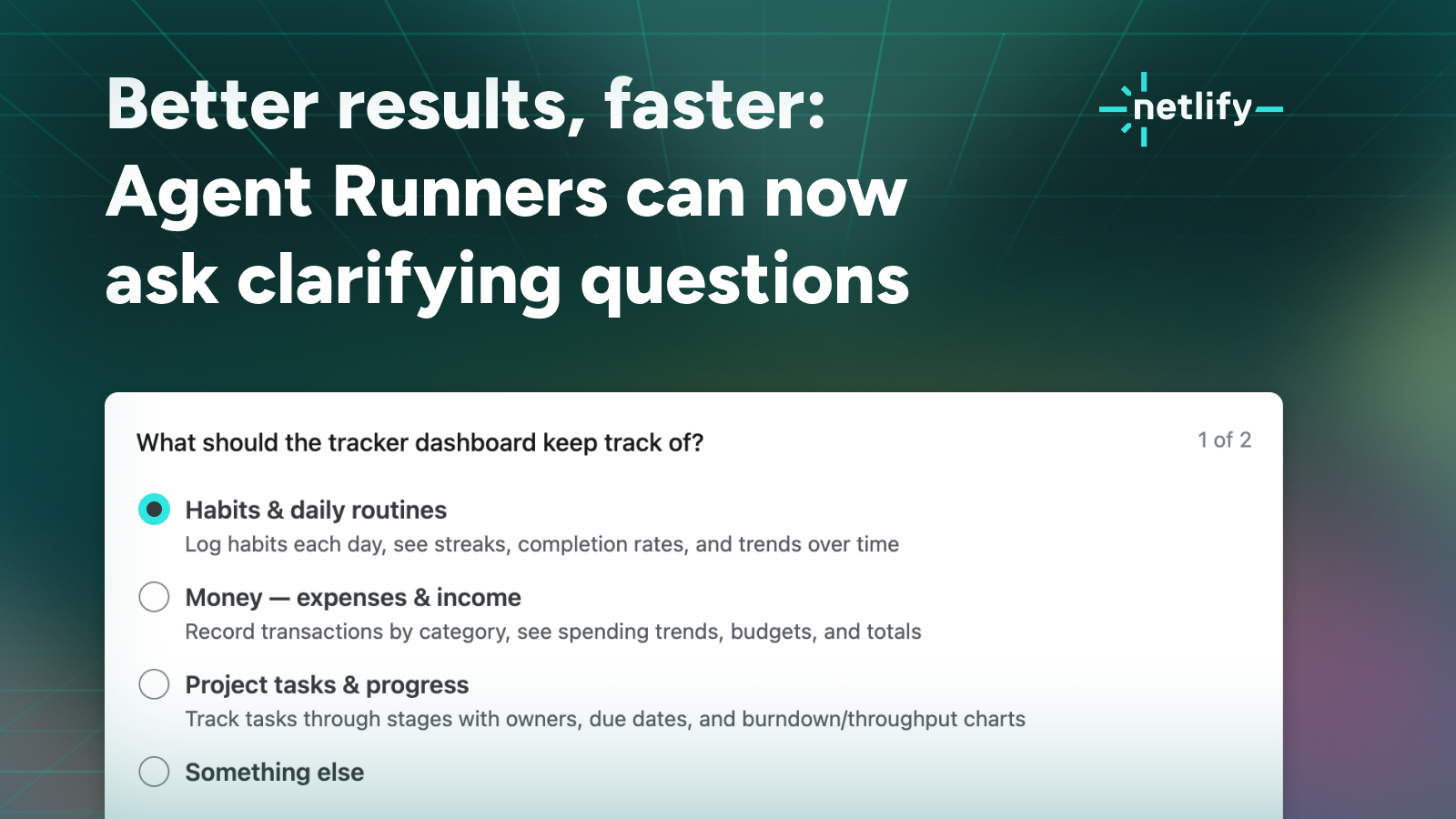
How clarifying questions work
Say you start with something broad, like “Build a tracker dashboard.” Previously the agent had to make every call for you: what the dashboard should track, whether entries should be editable and saved to a database or live in the code as a read-only placeholder, whether the look should be dark and high-contrast or light, clean, and editorial. Now it can ask, and you can answer directly where the agent run works.
Answer, skip, or add your own context
Answering questions is always optional so you can answer the ones you have opinions about and skip the rest. Or you can skip all questions and let the agent decide. Finally, you can always add context in your own words alongside your answers.
In our testing, even a few quick answers make the first build noticeably sharper and saves credits you’d otherwise spend on course corrections.
Once you answer, the run continues as usual: the agent writes the code, works with Netlify’s platform features, and creates a Deploy Preview you can review and iterate on.
Learn more
Clarifying questions work with every agent and model available in Agent Runners.
Try it out and see how to use Agent Runners in our docs.
-
Google’s Gemini 3.7 Flash model is now available through Netlify’s AI Gateway and Agent Runners with zero configuration required.
Use the Google GenAI SDK directly in your Netlify Functions without managing API keys or authentication. The AI Gateway handles everything automatically. Here’s an example using the Gemini 3.7 Flash model:
import { GoogleGenAI } from '@google/genai';export default async () => {const ai = new GoogleGenAI({});const response = await ai.models.generateContent({model: 'gemini-3.7-flash',contents: 'How can AI improve my coding?'});return Response.json(response);};Gemini 3.7 Flash is available for all Function types and Agent Runners. You get automatic access to Netlify’s caching, rate limiting, and authentication infrastructure.
Learn more in the AI Gateway documentation and Agent Runners documentation.