Today we’re excited to share that Netlify and Anthropic have partnered to bring Netlify support to Claude Design. It’s a simpler way for builders to move from an idea, to a design in Claude, to a live site on Netlify with a single click.
How it works
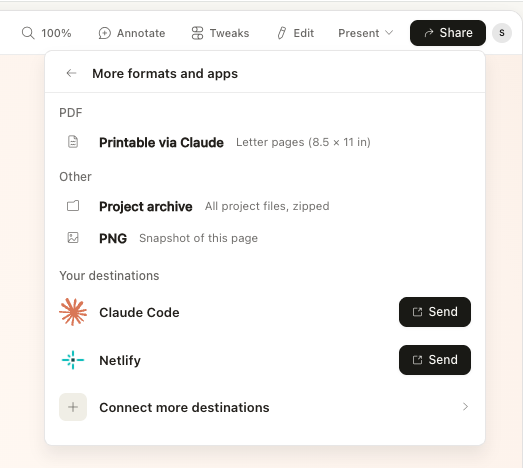
- In Claude Design, click Share.
- Select More formats and apps.
- Click + Connect more Destinations.
- Choose Netlify and connect your account.
You only have to connect Netlify once. After that, you can deploy from the Share menu any time or just type “Deploy to Netlify” in Claude chat.
From design to live site in one flow
Publishing should feel like part of the creative process, not a separate chore. When you’re designing in Claude Design, the moment you’re ready to share should be the moment your site is ready to go live.
With the new integration, you can deploy in seconds using the Netlify app inside Claude Design or simply ask Claude to “Deploy to Netlify.”
But that’s not all!
This integration isn’t just a faster first deploy. It gives builders a better way to keep creating after the first version is live.
Once you deploy a project to Netlify, you can continue iterating in Claude Design and then reshare to Netlify to push updates live. Your site stays current as your design evolves, without manual exports or re-uploading.
Go beyond static: add full‑stack capabilities with Agent Runners
When you’re ready to take a project further, you can pair this workflow with Claude Code running in Netlify Agent Runners to add the production features real apps need, such as:
- Databases and data modeling
- Authentication and user management
- Serverless functions and APIs
- Integrations and background jobs
In other words: start with a design, ship a site instantly, then grow it into a full application on the same platform.
Get started
Open Claude Design, look for the Netlify app, and deploy your project.
If you’ve been waiting for a smoother path from “made it” to “shipped it,” this is it.